Introduction

インターネットにつながっていない、閉域 LAN 内の iPhone の時刻を正確に同期する方法について。
Qita 等でそれなりに記事があるが、ざっくりとした記事が多く、わかりづらいと思ったので試してみた。

How to resolve?

環境は下記

サブネット IP ホスト名 OS
NTP サーバ兼 DNS サーバ 192.168.11.0/24 192.168.11.185 VM999 Ubuntu 24.04 LTS
クライアント 1 192.168.11.0/24 192.168.11.15 - iOS 15.8.6 (iPhone 7 Plus)
クライアント 2 192.168.11.0/24 192.168.11.49 - iOS 26.3.1 (iPhone SE3)

NTP サーバの構築

1. chrony のインストール
1
$ sudo apt install chrony
2. /etc/chrony/chrony.conf の編集

poolserver は使わないことで自分自身の時刻を配るように設定。

1
2
3
4
5
6
7
8
9
10
11
12
- pool ntp.ubuntu.com        iburst maxsources 4
- pool 0.ubuntu.pool.ntp.org iburst maxsources 1
- pool 1.ubuntu.pool.ntp.org iburst maxsources 1
- pool 2.ubuntu.pool.ntp.org iburst maxsources 2
+ #pool ntp.ubuntu.com iburst maxsources 4
+ #pool 0.ubuntu.pool.ntp.org iburst maxsources 1
+ #pool 1.ubuntu.pool.ntp.org iburst maxsources 1
+ #pool 2.ubuntu.pool.ntp.org iburst maxsources 2

+ local stratum 10

+ allow 192.168.11.0/24
3. chrony の起動及び動作確認
1
$ sudo systemctl restart chrony

NTP サーバ上で下記を実行し、chrony が動作していることを確認

1
2
3
4
5
6
7
8
9
10
11
12
13
14
15
16
17
$ chronyc tracking
Reference ID : 7F7F0101 ()
Stratum : 10
Ref time (UTC) : Sat Apr 11 05:45:23 2026
System time : 0.000000005 seconds slow of NTP time
Last offset : +0.000000000 seconds
RMS offset : 0.000000000 seconds
Frequency : 16.567 ppm slow
Residual freq : +0.000 ppm
Skew : 0.000 ppm
Root delay : 0.000000000 seconds
Root dispersion : 0.000000000 seconds
Update interval : 0.0 seconds
Leap status : Norma
$ chronyc sources
MS Name/IP address Stratum Poll Reach LastRx Last sample
===============================================================================

同一ネットワークの別マシンからも動作を確認。

1
2
3
$ sudo apt install ntpsec-ntpdate
$ ntpdate -q 192.168.11.185
2026-04-11 14:46:02.968082 (+0900) -0.000168 +/- 0.000309 192.168.11.185 s10 no-leap

もしここで、 ntpdig: no eligible servers と帰ってきたら、NTP サーバと通信できていないので、NTP サーバのファイヤーウォールか /etc/chrony/chrony.confallow が間違っているので確認する。

DNS サーバの構築

1. dnsmasq のインストール
1
$ sudo apt install dnsmasq
2. /etc/dnsmasq.conf の編集
1
2
- #conf-dir=/etc/dnsmasq.d/,*.conf
+ conf-dir=/etc/dnsmasq.d/,*.conf
3. /etc/dnsmasq.d/override-apple-ntp.conf の作成

ファイル名は *.conf であれば何でもよい。
別のマシンへの問い合わせも不要にしてある。

1
2
3
4
no-dhcp-interface=eth0

log-facility=/var/log/dnsmasq/dnsmasq.log
log-queries
4. /etc/hosts の編集

/etc/dnsmasq.confno-hosts をコメントアウトしたままなので、 /etc/hosts を編集するだけで名前解決をできるようにする。

1
2
3
4
5
6
7
8
9
10
11
12
+ 192.168.11.185 time.apple.com
+ 192.168.11.185 time-macos.apple.com
+ 192.168.11.185 time-ios.apple.com
+ 192.168.11.185 time1.apple.com
+ 192.168.11.185 time2.apple.com
+ 192.168.11.185 time3.apple.com
+ 192.168.11.185 time4.apple.com
+ 192.168.11.185 time5.apple.com
+ 192.168.11.185 time6.apple.com
+ 192.168.11.185 time7.apple.com
+ 192.168.11.185 time.euro.apple.com
+ 192.168.11.185 time.asia.apple.com

上記の Apple の NTP サーバのうち、使うのは一部だけだが念のため記載。

5. dnsmasq の起動及び動作確認

まず、 systemd-resolved を停止してから起動。

1
2
3
4
$ sudo systemctl disable systemd-resolved
$ sudo systemctl stop systemd-resolved

$ sudo systemctl restart dnsmasq

これを実施しないと、下記のように、dnsmasq 起動に失敗する。

1
2
3
4
5
6
7
8
9
10
11
12
13
14
15
16
17
18
$ sudo systemctl restart dnsmasq
Job for dnsmasq.service failed because the control process exited with error code.
See "systemctl status dnsmasq.service" and "journalctl -xeu dnsmasq.service" for details.
$ sudo systemctl status dnsmasq
× dnsmasq.service - dnsmasq - A lightweight DHCP and caching DNS server
Loaded: loaded (/usr/lib/systemd/system/dnsmasq.service; enabled; preset: enabled)
Active: failed (Result: exit-code) since Sat 2026-04-11 13:51:40 JST; 19s ago
Process: 8762 ExecStartPre=/usr/share/dnsmasq/systemd-helper checkconfig (code=exited, status=0/SUCCESS)
Process: 8768 ExecStart=/usr/share/dnsmasq/systemd-helper exec (code=exited, status=2)
CPU: 18ms

Apr 11 13:51:39 VM999 systemd[1]: Starting dnsmasq.service - dnsmasq - A lightweight DHCP and caching DNS server...
Apr 11 13:51:40 VM999 systemd-helper[8768]: dnsmasq: failed to create listening socket for port 53: Address already in >
Apr 11 13:51:40 VM999 dnsmasq[8768]: failed to create listening socket for port 53: Address already in use
Apr 11 13:51:40 VM999 dnsmasq[8768]: FAILED to start up
Apr 11 13:51:40 VM999 systemd[1]: dnsmasq.service: Control process exited, code=exited, status=2/INVALIDARGUMENT
Apr 11 13:51:40 VM999 systemd[1]: dnsmasq.service: Failed with result 'exit-code'.
Apr 11 13:51:40 VM999 systemd[1]: Failed to start dnsmasq.service - dnsmasq - A lightweight DHCP and caching DNS server.

同一ネットワーク上の別マシン (192.168.11.115) から名前解決を確認。

1
2
3
4
5
6
7
8
9
10
11
12
13
14
15
16
17
18
19
20
21
22
23
24
$ ip -4 a | grep inet
inet 127.0.0.1/8 scope host lo
inet 192.168.11.115/24 scope global eth0

$ dig time.apple.com @192.168.11.185

; <<>> DiG 9.20.11 <<>> time.apple.com @192.168.11.185
;; global options: +cmd
;; Got answer:
;; ->>HEADER<<- opcode: QUERY, status: NOERROR, id: 29191
;; flags: qr aa rd ra; QUERY: 1, ANSWER: 1, AUTHORITY: 0, ADDITIONAL: 1

;; OPT PSEUDOSECTION:
; EDNS: version: 0, flags:; udp: 1232
;; QUESTION SECTION:
;time.apple.com. IN A

;; ANSWER SECTION:
time.apple.com. 0 IN A 192.168.11.185

;; Query time: 0 msec
;; SERVER: 192.168.11.185#53(192.168.11.185) (UDP)
;; WHEN: Sat Apr 11 13:56:19 JST 2026
;; MSG SIZE rcvd: 59

ログを見ると、192.168.11.115 から問い合わせが来ていることが確認できる。

1
2
3
4
5
6
7
$ sudo tail -f /var/log/dnsmasq/dnsmasq.log
Apr 11 13:55:00 dnsmasq[8933]: started, version 2.90 cachesize 150
Apr 11 13:55:00 dnsmasq[8933]: DNS service limited to local subnets
Apr 11 13:55:00 dnsmasq[8933]: compile time options: IPv6 GNU-getopt DBus no-UBus i18n IDN2 DHCP DHCPv6 no-Lua TFTP conntrack ipset nftset auth cryptohash DNSSEC loop-detect inotify dumpfile
Apr 11 13:55:00 dnsmasq[8933]: read /etc/hosts - 20 names
Apr 11 13:56:19 dnsmasq[8933]: query[A] time.apple.com from 192.168.11.115
Apr 11 13:56:19 dnsmasq[8933]: /etc/hosts time.apple.com is 192.168.11.185

iPhone から時刻同期

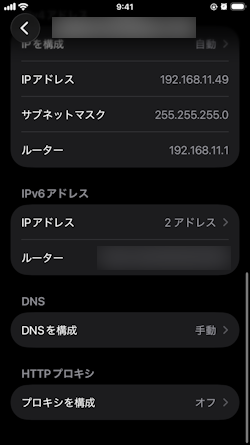
モバイルデータ通信を停止し、NTP サーバと同一のネットワークの Wi-Fi に接続。
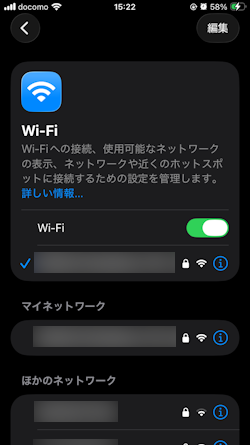
wi-fi1

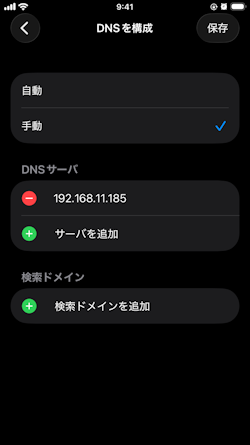
DNS を手動に変更。

wi-fi2

NTP サーバ兼 DNS サーバの IP を指定。

wi-fi3

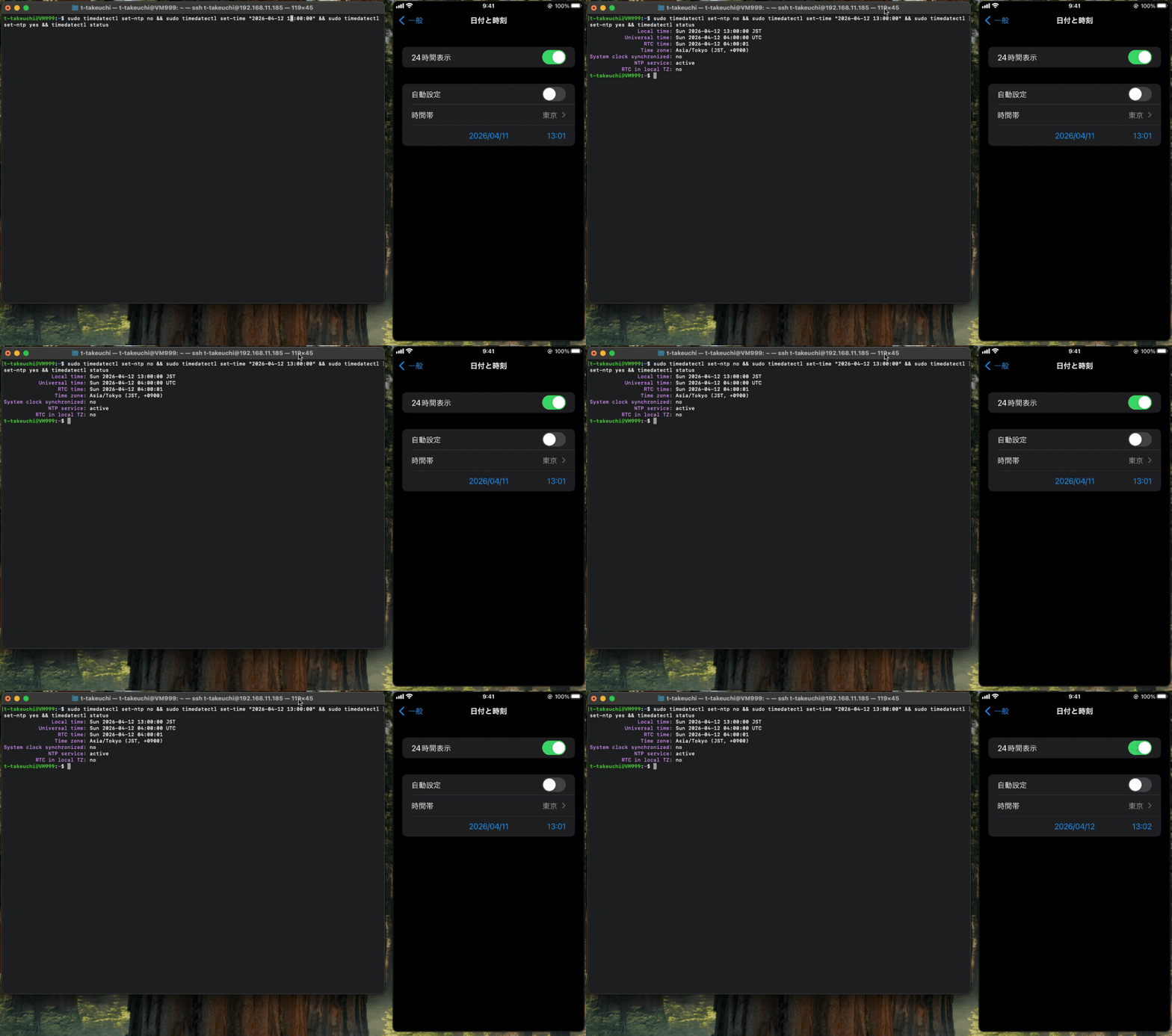
NTP サーバ上で時刻を強制変更。

1
2
3
4
5
6
7
8
9
10
11
$ sudo timedatectl set-ntp no
$ sudo timedatectl set-time "2026-04-12 13:00:00"
$ timedatectl status
Local time: Tue 2026-04-12 13:00:04 JST
Universal time: Tue 2026-04-12 04:00:04 UTC
RTC time: Tue 2026-04-12 04:00:04
Time zone: Asia/Tokyo (JST, +0900)
System clock synchronized: no
NTP service: inactive
RTC in local TZ: n
$ sudo timedatectl set-ntp yes

しばらくして、iPhone 上の時刻設定における 自動設定 の ON/OFF を切り替えると、時刻が主導してい時刻になっていることがわかる。
確認ができたら自動設定にすればよい。
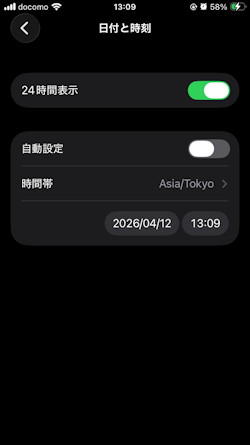
wi-fi4

NTP サーバ上の dnsmasq に対する名前解決の問い合わせが iPhone からきていることがわかる。

1
2
3
4
sudo tail -f /var/log/dnsmasq/dnsmasq.log | grep time
Jan 1 12:03:23 dnsmasq[8933]: query[A] time.apple.com from 192.168.11.49
Jan 1 12:03:23 dnsmasq[8933]: /etc/hosts time.apple.com is 192.168.11.185
Jan 1 12:03:23 dnsmasq[8933]: query[AAAA] time.apple.com from 192.168.11.49

下記は実際の変化の様子。
すぐに自動設定を切り替えても時刻の更新が走らないため、30 秒ほどたってから切り替えを行っている。
sync