
Introduction

掲題の通り。
わざわざ clang-format をインストールして環境を汚すのも嫌だし、調べたら最近の Microsoft の拡張機能に clang-format がバンドルされている、とのことで何もしなくてラッキー…と思っていたのだが動かなくてかなり悩んだ。

What’s problem?

運悪く、Zenn の記事、VSCodeでモダンなC++開発環境構築(CMakeとclang-format編) を見つけて、そこを見て設定を施したがうんともすんとも言わない。

この記事中では別に Remote-SSH で使えるとは一言も書いてないが、
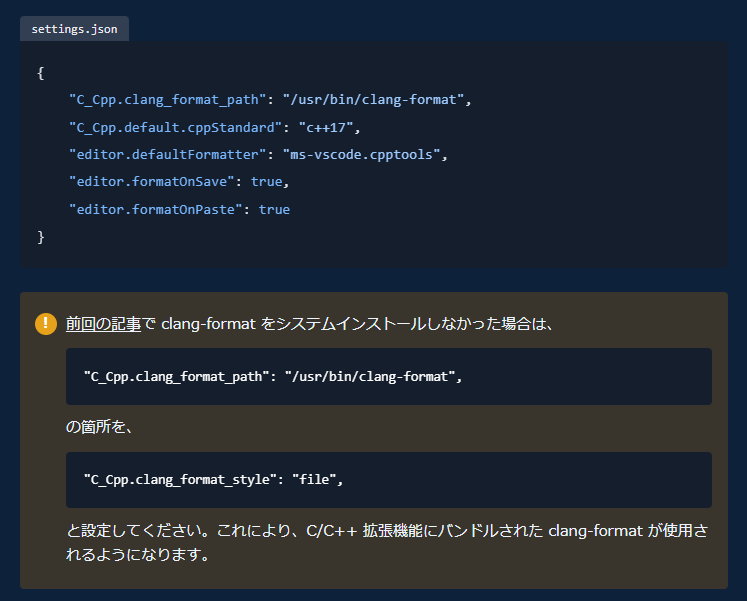
Zenn

と書いてあったので、素直に .vscode/settings.json

1
2
3
4
5
6
7
{
"C_Cpp.clang_format_style": "file",
"C_Cpp.default.cppStandard": "c++17",
"editor.defaultFormatter": "ms-vscode.cpptools",
"editor.formatOnSave": true,
"editor.formatOnPaste": true
}

を記述した。

が、動かない。
出力 タブ の C/C++ のコンソールを見ると

1
2
Formatting failed:
'C:\Program Files\LLVM\bin\clang-format.exe' --style=file --fallback-style=LLVM --Wno-error=unknown --assume-filename=/data/work/oss/test/main.cpp /data/work/oss/test/main.cpp

こんなエラーが出ている。
動くって書いてあったじゃん…

ということで、きちんと拡張機能の設定を見る。
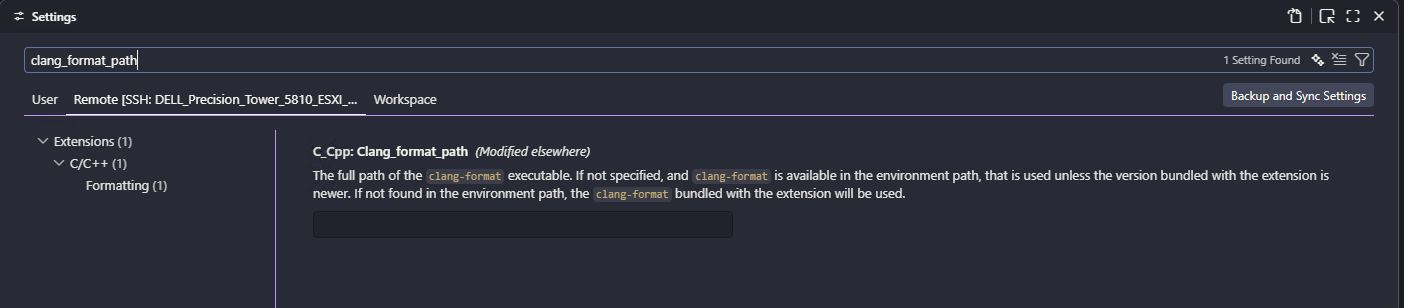
clang_format_path

The full path of the clang-format executable. If not specified, and clang-format is available in the environment path, that is used unless the version bundled with the extension is newer. If not found in the environment path, the clang-format bundled with the extension will be used.

要するに、「指定がない場合、環境変数 PATH に clang-format が存在すれば、それが使用されます。ただし、拡張機能に同梱されているバージョンの方が新しい場合は、そちらが優先されます。環境変数 PATH に clang-format が見つからない場合は、拡張機能に同梱されている clang-format が使用されます」、と。

システムにインストールされているバイナリの兼ね合いもあるが、正解は C_Cpp.clang_format_path"" を指定する、でした。
C_Cpp.clang_format_path そのものを削除したら、先のエラーメッセージのように、リモート (SSH で接続先) ではなく、ローカルの clang-format が使われてしまった模様 (下記はローカルの Windows から Ubuntu 22.04 に接続しているときの様子)。
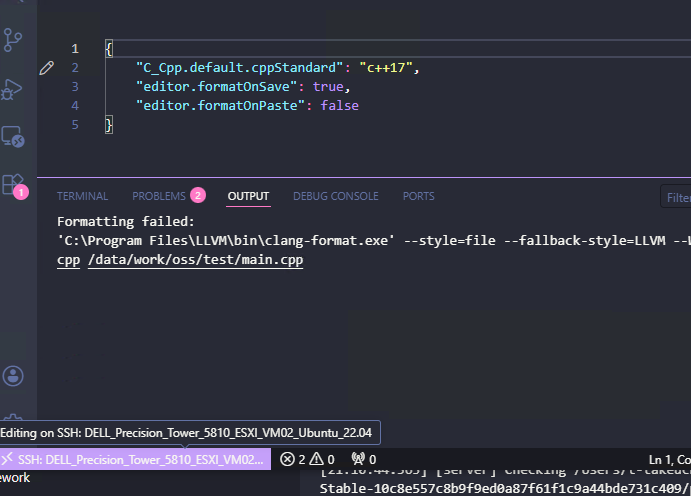
clang_format_path

最終的には下記の設定に落ち着いた。

1
2
3
4
5
6
{
"C_Cpp.clang_format_path": "",
"C_Cpp.default.cppStandard": "c++17",
"editor.formatOnSave": true,
"editor.formatOnPaste": false
}

肝心の .clang-format の内容は Clang-Format Style Options を参照。
自分はこのようにした。

1
2
3
4
5
6
7
8
9
10
11
12
13
14
15
16
17
18
19
20
21
22
23
24
25
26
27
28
29
30
31
32
33
34
35
BasedOnStyle: Microsoft
IndentWidth: 4
AlignAfterOpenBracket: Align
AlignArrayOfStructures: Left
AllowAllArgumentsOnNextLine: false
AllowShortCaseLabelsOnASingleLine: false
AllowShortFunctionsOnASingleLine: Empty
AllowShortIfStatementsOnASingleLine: Never
BraceWrapping:
AfterNamespace: false
AfterCaseLabel: true
AfterClass: true
BinPackParameters: OnePerLine
IndentCaseLabels: true
Cpp11BracedListStyle: false
AllowAllParametersOfDeclarationOnNextLine: false
PenaltyBreakBeforeFirstCallParameter: 100000
PenaltyBreakOpenParenthesis: 100000
PenaltyExcessCharacter: 1000
PackConstructorInitializers: Never
SpaceBeforeCaseColon: false
SpaceBeforeCtorInitializerColon: false
SpaceBeforeInheritanceColon: false
SpaceBeforeEnumUnderlyingTypeColon: false
SpaceBeforeJsonColon: false
SortIncludes: true
SortUsingDeclarations: Lexicographic
BreakConstructorInitializers: AfterColon
BreakInheritanceList: AfterComma
BreakTemplateDeclarations: Yes
InsertNewlineAtEOF: true
WrapNamespaceBodyWithEmptyLines: Always
MaxEmptyLinesToKeep: 1
FixNamespaceComments: true
ShortNamespaceLines: 0

今後細かく調整していきたい。